
Скачать Honestech Video Editor – видеоредактор, программное обеспечение для видеомонтажа, создатель видео, создатель видео для Windows, инструмент для видеомонтажа, видеоредактор для Windows
Обзор
Honestech Video Editor, разработанный компанией Honest Technology, — это приложение для видеомонтажа под Windows, созданное для предоставления пользователям инструментов, необходимых для создания отполированных, профессионального уровня видеороликов из личных видеозаписей, изображений и аудио. Программное обеспечение ориентировано как на любительских создателей, так и на опытных редакторов, ищущих надёжную, насыщенную функциями платформу для производства кинематографического контента без сложности высококлассных профессиональных пакетов. Оно решает типичные проблемы видеопроизводства, такие как неэффективное управление сценами, непостоянный уровень звука и трудоёмкие ручные правки. Интегрируя интеллектуальную автоматизацию и интуитивные элементы управления, Honestech Video Editor упрощает рабочий процесс монтажа, позволяя пользователям сосредоточиться на рассказе истории, а не на технических препятствиях.
Практические примеры использования включают создание семейных документальных фильмов, контента для социальных сетей, рекламных видеороликов и личных проектов. Приложение заполняет нишу в категории продуктивности, предлагая настольную альтернативу облачным или мобильным видеосервисам, особенно для пользователей, которым важны контроль, производительность и офлайн‑монтаж. Его выпуск 15 марта 2024 года позиционирует его как современное решение в постоянно меняющемся ландшафте цифрового контента. Разработчик не предоставил дополнительных технических деталей, кроме даты выпуска и версии.
Ключевые функции и возможности
- User-Friendly Interface: The latest version introduces a simplified, intuitive layout that reduces the learning curve for new users. The redesigned workspace organizes tools logically, allowing quick access to core functions like trimming, splitting, and applying effects.
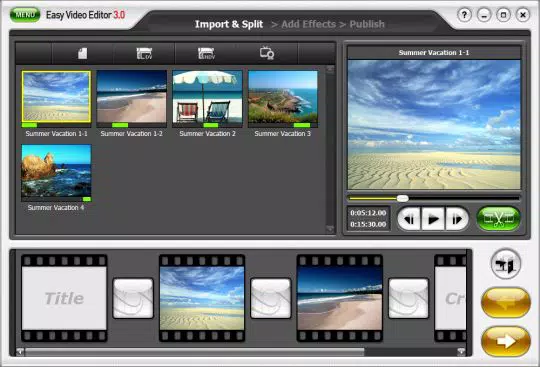
- Auto-Scene Detection: This feature automatically identifies scene changes in video clips by analyzing visual transitions, enabling users to segment footage into distinct scenes without manual effort. This is especially useful for long recordings such as events or interviews.
- Advanced Split and Merge Tools: Users can precisely cut out unwanted segments or seamlessly combine multiple clips. The feature supports both single and multi-track editing, offering flexibility in storytelling and pacing.
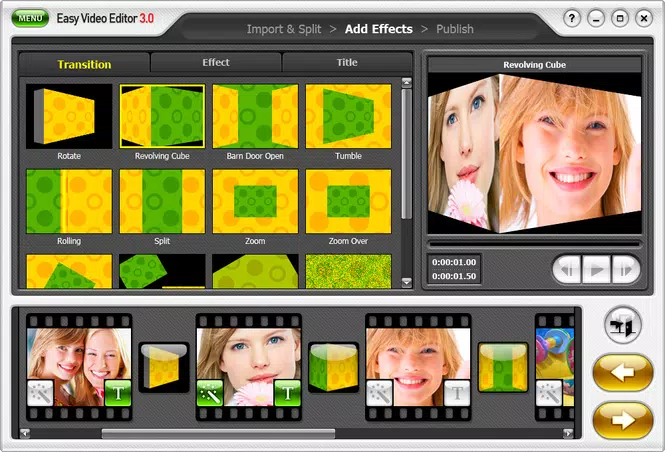
- Customizable Fade-In/Fade-Out Effects: These transitions allow for smooth scene changes, enhancing the cinematic quality of the final output. Users can adjust duration, intensity, and timing to match the mood of their content.
- Volume Control for Video and Audio: Integrated audio adjustment tools let users balance dialogue, background music, and sound effects. This ensures audio clarity and prevents abrupt volume shifts during playback.
For example, a user editing a wedding video can use auto-scene detection to separate ceremony, speeches, and reception segments, then apply fade effects between scenes for a polished finish. The volume control feature helps balance ambient noise with speech, improving overall audio quality.
Interface, UX & Performance
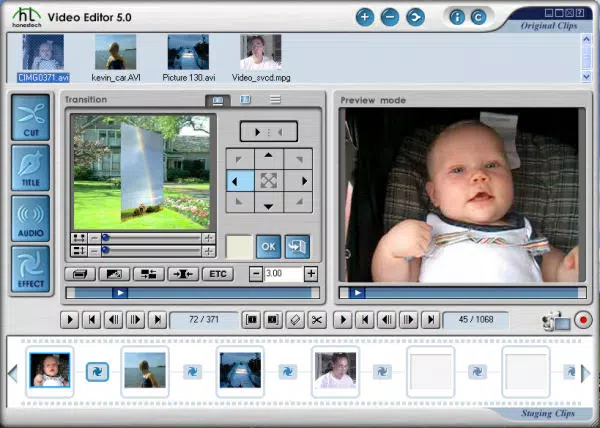
The user interface of Honestech Video Editor is structured around a central timeline, with media bins, preview windows, and effect panels arranged for efficient workflow. The visual style is clean and minimalistic, reducing visual clutter and enhancing focus on content. Navigation is primarily mouse-driven, with keyboard shortcuts available for advanced users. The layout supports customizable workspaces, allowing users to tailor the environment to their editing preferences.
Although the developer did not list formal performance metrics, the application is designed to operate smoothly on modern Windows systems. It supports real-time preview rendering, which contributes to a responsive editing experience. Stability appears to be prioritized, as the software maintains consistent performance during extended editing sessions. Responsiveness is maintained across different screen resolutions, though specific requirements were not disclosed. The developer did not specify minimum OS requirements or compatibility details beyond the platform.
Platform Compatibility & Technical Requirements
Honestech Video Editor is designed for the Windows operating system. The current version is 7.0, with a file size of 256.7 MB. The software is available for installation on desktop and laptop systems running Windows. Specific requirements such as minimum RAM, processor type, or supported Windows versions were not listed by the developer. Compatibility information was not fully disclosed, and no details were provided regarding support for older or newer Windows releases.
Pros and Cons
Pros
- Intuitive interface suitable for beginners and experienced users
- Auto-scene detection streamlines video segmentation
- Advanced split and merge tools for precise editing
- Customizable fade effects for cinematic transitions
- Integrated volume control for balanced audio output
Cons
- Platform limited to Windows; no mobile or macOS support
- Specific system requirements were not disclosed
- Price point may be high for casual users
- No cloud sync or collaboration features
- No information on update frequency or future development plans
FAQ
Is Honestech Video Editor available for Android or iOS?
No. The app is exclusively designed for Windows operating systems and is not available on mobile platforms.
Can I use Honestech Video Editor without an internet connection?
Yes. The software operates offline, allowing full functionality without requiring an internet connection.
Does the app support 4K video editing?
The developer did not specify support for 4K resolution. However, the software is designed to handle high-definition video files.
How often are updates released?
Specific update frequency was not disclosed by the developer.
Is the software secure to download and install?
Yes, Honestech Video Editor is developed by Honest Technology and distributed through official channels. It is recommended to download from trusted sources to ensure security.
Final Thoughts
Honestech Video Editor stands out as a capable video editing tool for Windows users seeking a balance between professional features and ease of use. Its intelligent automation, such as auto-scene detection and customizable transitions, significantly reduces editing time while maintaining creative control. The integration of audio and video editing tools in a single interface enhances workflow efficiency, making it ideal for content creators who value precision and polish.
While the lack of cross-platform availability and undisclosed system requirements may limit accessibility, the software’s value proposition remains strong for desktop users. Its $39.99 price tag reflects its feature set, particularly for those producing high-quality personal or promotional videos.
Download Honestech Video Editor now


